10 seconds
The Glance
Did the day go well, what did it cost, and the one thing that needs you. Made for your phone.
 Join the waitlist
How it works
One office for your whole business. Your AI board plans every morning, a critic checks every task, and you approve what matters. This page has every detail: the Observatory, a day in the office, the rules, the plans, every question we’re asked, and what the names mean.
Shopify, Square, Amazon and Meta each give sellers an AI helper of their own now, and each one works inside its own platform. SKYROOK’s board gives every platform its job, and from the Observatory you oversee everything in one place.
The Observatory stands next to your office tower: a tall building with wavy balconies. You oversee everything from its top floor; your departments run the floors below, and the lobby’s directory lists every floor with the department that runs it.
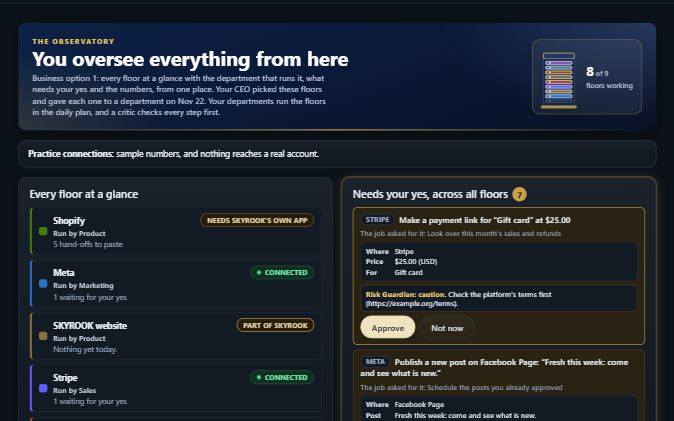
Oversee and manage everything from one place: every platform at a glance, what needs your yes, and the overall numbers.
One floor for each account and platform your business uses, each run by one of your departments. See what its department did today and what waits for your yes, and work with it there. A critic checks every step before it runs.
Some connect directly, others work through copy-ready hand-offs. Square, Facebook, Instagram, YouTube, Pinterest and Calendly connect directly today. The CEO picks the floors that fit your business and gives each one to a department; you can add, remove or move any.
Hand-offs now, direct links next: as each platform opens its own AI to outside offices, SKYROOK hands the jobs straight over.
Sign in to each account once and your office can see it from then on. Every account is a floor in the Observatory, run by one of your departments: Google, Stripe, QuickBooks, HubSpot, Mailchimp and Gmail for sending connect directly today, and so do Square, Facebook, Instagram, YouTube, Pinterest and Calendly. A floor that can’t connect yet works by hand-offs you paste. Coming soon Direct connections to Shopify and Amazon; until then their floors work by hand-offs too.
Every morning your board plans the day and hands out the work. Each department also gets up to 3 managing jobs for the floors it runs, like “Shopify: restock the three best sellers” or “Meta: schedule the approved posts”, and a critic checks every step before it runs.
At the end of each work day the office tells you what it did, in plain words, with the checks. The Observatory shows every floor at a glance, with the department that runs it. Money, new posts, replies and anything sent still wait for your yes.
The CEO sets the day’s priorities and its anti-agent challenges them. Directors hand out the tasks, the COO puts the work in order, and the CEO estimates what the day’s AI will cost.
The morning’s planning is paid as it runs. When the CEO’s estimate fits your plan, deposit or daily budget, the office approves the day itself; anything more waits in the inbox for the owner’s yes, and until then only the free part of the day runs.
Workers ask the Research department when they need facts. An independent critic reviews every piece, code recomputes the numbers, and a Director rules when they disagree.
Directors report to the CEO, the CEO writes the daily report, the Audit department checks every claim, and the office learns from the day’s problems.
10 seconds
Did the day go well, what did it cost, and the one thing that needs you. Made for your phone.
2 minutes, or listen
Your CEO tells you how the day went, in plain words. Press Listen and it reads itself to you.
Check everything
Every task and what it found, where every dollar went, what the reviewers objected to, and what waits for you.
Every business walks the same path, one piece of work at a time. Each step lights up gold when it is done. This one is an example, not a real business: open a step to see what it is and why it matters.
The path loads with the page.
We talk about the work SKYROOK does, never about money you’ll make. Nobody honest can promise that.
Each plan pays for your whole office: the board, the departments and their critics, the reports, the Inbox and the Observatory. It also includes a set amount of work each month, which pays for the AI behind the tasks. Extra work past your plan comes from your deposit, shown as SKYROOK usage.
| Plan | A month | Work included | About | Businesses | Free redos |
|---|---|---|---|---|---|
| Spark | $49 | $20 | 3 work days a month | 1 | up to 3 a month |
| Engine | $149 | $60 | 9 work days a month | 1 | up to 5 a month |
| Empire | $399 | $180 | 28 work days a month | up to 3, sharing it | up to 10 a month |
The Observatory is your building: where you, the owner, oversee and manage everything from the top floor, with every floor at a glance, what needs your yes, and the numbers. Below are the Platform Floors, one for each account and platform your business uses: the CEO picks the ones that fit from 30+ platforms (online marketplaces, store builders, social and video, local, food and services) and gives each one to a department of your team, and you can add, remove or move any. You connect a platform once. Each morning the department that runs a floor gives it up to 3 managing jobs, and a critic checks every step before it runs: small safe steps run by themselves, with an Undo for 7 days where the platform allows it, and money, new posts, replies and anything sent wait for your yes. On a floor you see its numbers, what its department did and what waits for you, and the day’s report says what each department did. Where a platform’s own assistant takes the job, or SKYROOK can’t act on that platform directly yet (Amazon, Shopify and others, for now), you get a hand-off: the exact words to paste into that assistant, and a Done button.
It promises the work, not the money. Every day is planned, done, checked and reported, and you approve what matters. Whether a business sells depends on many things nobody controls, so SKYROOK never tells you how much you’ll make. Be careful with anyone who does.
People do. The office proposes; every step that spends, sends, publishes or signs up waits in the inbox for the owner’s yes, and so does the team the CEO designs. Only small safe steps in your accounts, like tagging a product, run by themselves, with an Undo for 7 days where the platform allows it. Two kinds of answer don’t wait forever. If the business pick sits a day without an answer, the CEO starts building its choice, and the owner can keep it or switch. A low-risk skill, or a risk flag the Risk Guardian cleared, left a day is answered by the board, with Undo for 7 days. Neither one spends, publishes or signs anything.
No. Everyone in the office is an AI agent with a name and a face, so you can follow who did what. None of them is a person.
A monthly plan: Spark $49 with $20 of work included, Engine $149 with $60, or Empire $399 with $180 for up to 3 businesses. Extra work comes from a deposit you add (at least $20), shown as SKYROOK usage. Work is priced by SKYROOK, and you see each day’s price before it starts. Try any plan free for 7 days (up to 3 work days and $12 of work; a card is needed). After the morning’s planning, the CEO estimates the day’s cost. When it fits what the plan, trial or deposit can pay, the office approves it itself and the work starts; anything more waits for the owner’s yes, and until then only the free part of the day runs. Every AI call is counted on the business’s Dashboard.
Research, plan, draft, check and report. In the accounts you connect, the department that runs each floor also takes small safe steps, each checked by a critic first, with an Undo for 7 days where the platform allows it. It can’t spend money, contact anyone outside, publish or sign up for anything by itself: each of those is a step a person takes. An agent unsure whether something is allowed raises a risk flag for the owner.
Yes. Inside a business you can follow the office live on a 2D office floor, an org chart and a 3D Chicago tower with the Observatory beside it, read the chat room where the board debates, and open each work day’s report.
Yes. The sample office opens without an account: a made-up business with made-up work, read only, so you can walk around the 3D city and every room before you choose. Nothing there is yours, and nothing you do there reaches a real account.
For now, press Join the waitlist: leave your name, email and your business or idea, and we email you when your spot in a founding group opens. Later, where sign-up is open, you make your account and confirm your email with a 6-digit code; otherwise you leave your name and email, and the admin sends you a link where you choose your own username and password. Then you choose a plan (or start the free trial) and add your business; once your plan or trial is on, your office opens with the board’s welcome chat. Forgot your password? Email SKYROOK’s founder for a new password link.
On the computer SKYROOK runs on, each business in its own folder. To do the work, the text of each task goes to the AI services the business uses: mainly Claude (by Anthropic). Plans, reports and boardroom messages also go to DeepSeek and Google Gemini, where the anti-agents check the board’s work and a backup AI answers when the main one can’t. Their free plans may use what they get to improve their products, so never write passwords, card numbers or bank details there. If email is set up, the daily report and the items waiting in the inbox are also emailed to the owner, and the owner’s replies are read from that mailbox. Deposits and plans paid by card are paid on Stripe’s own page, so SKYROOK never sees the card. Passwords are stored only in scrambled form, logins use secure cookies, and five wrong tries lock a name for 15 minutes.
SKYROOK keeps a few special names. Here is what each one means.
SKYROOK opens in small founding groups. Leave your name, email and idea, and we email you when your spot opens. Nothing to pay now.